Why website is not working?

Your first thought should be, “Is this site down?” if a website keeps loading but never fully opens or if it shows an error message but won’t let you read the page. Is it down for everyone or just me? ought to be your next question. When attempting to solve the issue, this distinction is crucial. You can take different actions depending on whether the site is unavailable to everyone or just you. To find out if the website is genuinely down or if something is merely blocking you from accessing it, keep reading. Which step to follow? CSS Fonder – A website design company in Bangalore says the simple part is figuring out if a website is down for everyone or just you. You can find assistance with this work on a number of websites. Down for Everyone or just me are the most well-liked link. Choose the link, type the address of the problematic website into the text box, and choose just me. You can find out if the site is genuinely down on a results page. What happens if Down for Everyone or Just Me is not available? You might try a number of comparison websites, such as Down.com and Is It Down Right Now. What if the website is Really Down? There isn’t much you can do to fix the issue if the site in question is down according to the tool you’re using and it’s down for everyone else as well. In actuality, the only genuine “fix” for a down website is to wait it out. The problem might be anything from a bandwidth overload to a website manager who neglected to pay the hosting cost, both of which are outside your control. The good news is that if it’s a well-known website, it will probably get back online quickly—possibly in just a few minutes. What if Only One Page Is Down? It’s also possible for some elements of a website to be unavailable while other parts continue to function. For instance, when a well-known website like Facebook is unavailable, it’s typically only a problem with image or video uploads, status updates, or something similar. It’s unusual for the full website to be unavailable. Remove all of the URLs but the domain name to see if the entire site is down or just a particular page. Enter merely cssfounder.com into the URL field in your browser and press Enter if, for instance, the address of the issue page is https://www.cssfounder.com/website-development-cost/ The website is functioning normally if this URL resolves; the down issue is with the particular web page you were trying to access. The page might also have been permanently deleted. View an Archived Version You may be able to access an archived version of the website if all or a portion of it is unavailable. Look for a cached version of the page you’re trying to access on Google. Even if the website is down, you can still access the page if Google cached a copy of it. Try viewing the webpage via Way Back Machine, a service that regularly archives web pages, if that doesn’t work. What if the problem isn’t the website The issue must be on your end if the website was detected as online by one or more down website detectors. Unfortunately, diagnosing the cause of your inability to view a working website is more difficult than dealing with a down site. The following procedures will help you identify the issue if you are unable to view a website due to a variety of causes. Take them one at a time. Verify the URL once more. Because one of the most frequent causes of not being able to visit a web page is entering an incorrect URL. The website may lead to a redirect to another website or an error page, giving the impression that it is down when it is not. Try accessing the website from a different computer connected to the same network. Try it on a family member’s laptop using the same connection, for instance, if you originally tried it on your laptop using the internet connection at home. A website designing company in Noida says If the website loads on the second device, you have established that it is live but for some reason, the first device you tried to access cannot. Now that you know to troubleshoot the original device instead of your connection, you can. Use a different web browser to try the webpage. It’s possible that your browser’s add-ons or permissions are making the page crash every time you try to access it. You might need to uninstall a few extensions, reset the browser’s settings, or reinstall the other browser if the new one allows you to visit the page. Try the webpage with a new, unmodified browser to see if you need to take those actions. Occasionally, opening the page in your browser’s private mode instead of using a different browser may be sufficient, depending on how your browser is configured. Close and then reopen the web browser to restart it. Close the app fully on a tablet or phone before attempting again. Restart the entire device if the website is still unavailable. Delete the cache from the browser: It’s possible that cached files are preventing your browser from downloading new web pages. Utilize many DNS servers: Even though the website is perfectly safe, the DNS server your device is using may have blocked access to it due to faulty entries or malicious flags placed on the website. You can choose from a number of free DNS servers to determine if DNS is the cause of the site’s outage only for you. Check for malware on your machine. If the site is actually harmful, a virus or other illness can be preventing you from accessing it. Although the site is completely safe, some malware scanners produce false positive results that give the impression that the site is down. If you think this
Why website is not opening

A website may not load for a variety of reasons, including misconfiguration, corrupt files, issues with a database, or something as simple as the need to clear the cache and cookies in your browser on your computer. Server or hosting issues: The website’s server may be experiencing technical issues, or the hosting provider may be down. This can prevent the website from loading correctly. Connectivity issues: It’s possible that there is an issue with your internet connection. If you are experiencing slow internet speeds or intermittent connectivity, this can prevent the website from loading correctly. Browser or device issues: There may be an issue with your browser or device that is preventing the website from loading correctly. Try clearing your browser cache and cookies, or try accessing the website from a different device to see if this resolves the issue. Domain name issues: If the website’s domain name has expired or is incorrect, this can prevent the website from loading correctly. Firewall or security settings: If your computer or network has strict firewall or security settings, these may be preventing the website from loading correctly. What to do when website is not opening? Check Website Status I would advise you to check and confirm the website status before I continue and explain the potential causes of a specific website’s malfunction. You can get a better understanding of what’s happening by using a variety of free online services. This will also reveal whether a specific website is unavailable worldwide or just for you. You can use websites like Down For Every One Or Just For Me and Is it Down Right Now? to see if the website is functioning properly for everyone else besides you. The next step is to examine the various scenarios and resolve the issue. How to fix website when not opening? If you’re experiencing issues with a website not working, there are several steps you can take to try and resolve the issue. Here are a few things you can try: Check your internet connection: The router installed in your home or another location is where all the data you download and upload on your computer travels. The router may be having some trouble connecting to the website you’re attempting to access. Ensure that your internet connection is working properly. If you’re using a wireless connection, try resetting your router or modem. Clear your browser cache and cookies: Your web browser saves data in the form of cookies, cache, certificates, form data, etc. for almost every website you visit on your computer. This information is used by the website to recognise you on subsequent visits. Additionally, because your browser doesn’t need to download the website data every time, the cached information on your computer saves you money on your internet bill. There is a possibility that something negative occurred with those cookies and the cache. Clearing your browser cache and cookies can sometimes resolve issues with a website not loading correctly. Go to your browser settings and clear your cache and cookies. Try a different browser: If the website is not working in one browser, try accessing it from a different browser to see if the issue persists. Disable browser extensions: Some browser extensions can interfere with the functioning of websites. Try disabling your browser extensions and see if the website starts working. Check for DNS issues: Every website address you enter on your computer is automatically resolved using the DNS server run by your internet service provider. The server may occasionally be unable to handle all of the requests coming from customers’ computers. As a result, it is unable to return the websites’ IP addresses. It may be one of the main causes for why you are unable to access a specific Internet site. DNS issues can sometimes prevent websites from loading correctly. Try clearing your DNS cache or using a public DNS server like Google’s DNS server. Check the website’s status: Check if the website is down for everyone or just you. Use a website monitoring tool or check social media for any reports of the website being down. Geographical restriction: There is a good chance that the website you want to visit was buried by government internet censorship. It is not surprising that governments all over the world restrict access to certain websites because they fear that people will start to distrust them. Another possibility is that the website itself has for some reason stopped offering services in your nation. For instance, the licencing restrictions applied to the website content. Try using another network or your friend’s internet connection to access the website. It will also confirm that your region is barred from accessing that website if it is unable to load. When someone tries to open a website that is blocked by the government, a message is shown. Contact the website owner or webmaster: If none of the above steps work, contact the website owner or webmaster and report the issue. They may be able to provide further assistance or resolve the issue on their end.
Website Hosting

When we create a website, it has many files including code, images, videos, and text that comprise a website and need to be stored somewhere. Website hosting fulfills that demand and allows the user to store their content to build a durable digital presence with security and support. You can get your website to be hosted with the right plan on the web server by contacting any web design company in Pune. Website hosting is a service that provides some storage for web pages. This allows the organization to publish a website onto the Internet so that anyone who is having access to the internet can access the website. Every website that we visit is hosted on a web server. The amount of storage allocated on the server for the website depends on the type of web hosting. A few popular types of web hosting are shared, dedicated, and VPS. They all used different types of technology for the server. Website hosting is a process of renting a secure space on the server for a website to publish its content over the World Wide Web. What is Server? A server is a computer that connects web users to the website anywhere in the world. It provides a service to other computer programs and their users known as client. Server can refer to a physical machine or a virtual machine that is performing the server service. In client and server model the server fulfils the request of the client users. There many types of servers and based on their work web server is the one that serves the request of HTML page and it is used to website hosting. How Website hosting work When the files of website are uploaded on the web server the web hosting happens. The server runs continuously to make the website available for the visitors all the time. Once the user enters the domain name into browser the web host server will transfer the files that are necessary from your website. You can host your website yourself but that require a lot of technical skills and setting up of web server from scratch including hardware and software. A website hosting service provider ensure that your website perform well with better security. Website hosting services maintain and secure the storage space. Hosts store the data in the hardware to allow easy maintenance and access by client users. Types of website hosting Shared Hosting In shared hosting thousands of websites are hosted on the same physical server. Each website has its own allocation of web space and few set of bandwidth limit but they all share the same physical memory. Multiple websites share the same server resources including processing power and storage space as well. This is affordable and excellent option for small business/personal website with static website design that doesn’t require advance configuration and higher bandwidth. Pros Cost-effective Great for small business and individual Best for beginners Pre-configure server option No need to worry about the maintenance and server administration Cons Minimal access Can be affected by other websites traffic and load. Virtual Private Server This hosting allows your website to share a physical server with other but you will get a separate virtual partition. With virtual private server you will get an allocated number of resources. This is best option for medium side website with dynamic website design. This is recommended for the user with highly server management skills and experience. The website owners have the access to root for their partition and can configure their server software as well. You will get a high level of customization to run your website. Pros Dedicated server No impact from other website Root access of the server High customizability Sperate resources Cons Require technical skills Need developer for virtual server Cloud Hosting This website hosting uses virtual server to host the websites. Cloud hosting has become a nebulous term and every website owner is prefer to opt cloud hosting for their website. This is expensive but provide a smooth-running experience despite of traffic spike. This cloud hosting uses several virtual servers so that if any problem arises with respect to increase in traffic, other will take over and maintain the website functionality. Cloud hosting is recommended for eCommerce website development with a huge traffic. This is considered to be the most secured web hosting solution as well. Pros Reduce hardware failure Handle high traffic Prevent DDoS attack Scalable Secure Cons Root access is not provided Expensive Conclusion There’s a lot of confusion while taking the decision for website development as which web design agency to choose and which hosting plan will be the right option for our website. Whether you need a blog website or any website with eCommerce functionality your digital presence is important though you need to get your work done with the right people and right plan. If you wanted to get your website done with the right hosting plan then you can visit to CSS Founder for more info and related services. We are open for all.
Difference between static and dynamic websites

When we say a website, it can be of two types. As a business owner or an individual, you just need to know which type of website works best for you, what function you want to be in your website, and how you choose to build it. When we surf the internet there are two aspects that regulate the communication between the user and the website, which are a web browser (client) and a web server (server). This communication is regulated with some protocols like HTTP, where the browser sends an HTTP request to the server and then the server returns an HTTP response to the browser, and on the basis of this response that is sent to the browser website can be defined as static or dynamic. Understanding the differences between static and dynamic websites can be complicated. What is a static website? According to the CSS Founder – A Website Designing Company in Ghaziabad. A static website consists of a fixed number of web pages created using HTML, CSS, and JavaScript with fixed content and structure. The page of a static website is stored as a single HTML file, that is directly delivered from the server to the web page as it is. The content of a static website won’t change unless the code of the original HTML file is edited. A static website is just simple information provided that transmits the response to the client without performing any processing. The user sees the same content of the website regardless of who they’re, which browser they’re using when they’re using, and where they’re using. Advantages of static website The static website takes less time for building and deployment They are secure Load faster Rank high on SERP easily Take low cost Easy to restore after a crash. Disadvantages of static website Updating a static website is can be challenging May be slightly outdated Less user experience No interaction with clients Limited Scalability What is a dynamic website? Dynamic website is built using server-side languages and technologies that allow the content of every page to be delivered dynamically according to the user’s behavior known as user-generated content. The dynamic website generates web pages in real-time. A dynamic website uses a database to store the data and those database records are maintained and change the content of the dynamic website. A dynamic website is flexible with content and structure that make a better user experience based on the user’s request. Dynamic website is created using server-side programming languages like PHP, C#, or Python. These server-side codes are used to build dynamic websites that can generate real-time HTML pages that fulfill the user’s request. Advantages of Dynamic website More functional An organized way to store information User-based content Easy to update Better user experience Disadvantages of Dynamic website Expensive for creating and maintaining Slow processing
Different Types of Web Hosting

Web hosting is an important factor in ensuring website performance, speed, and availability. Web hosting is a medium that makes websites accessible to all on the Internet. Because of these essential elements for powering websites online, there are plenty of options available. Though one of the biggest challenges for setting up a website is deciding which type of web hosting plan to choose. There is a lot of option to choose from and they vary in price and functionality. For the selection of a web hosting plan, the cost is not the only concern there are different needs of websites that need web hosting that fulfill that needs and requirements. CSS Founder a web designing company in London is offering a full range of web hosting services under a budget-friendly cost that you might concern about for your website. What is web hosting? Web hosting is an online service that enables our website’s content to be accessible on the internet. Whenever we are purchasing any web hosting plan that means we are renting a space on the physical server that will store all of our website’s files and data. These web hosting service providers provide the hosting technology and resources that are required for the effective and secure operation of the website. Different types of web hosting Shared Hosting Shared hosting is the most common choice of web hosting among website owners. In this hosting plan, a single server is shared among multiple users which means a shared server will host multiple websites. With shared hosting, all the domain shares the same server with the server resources like RAM, Storage, Bandwidth & CPU. Due to the sharing of all the resources of the hosting servers, the best shared hosting plans are relatively low and perfect for entry-level websites. This hosting plan is best for a small website, blogging, or small business website. Virtual Private Server hosting VPSs web hosting plan is an upgrade plan that is a middle ground between a shared server and a dedicated server. This hosting plan enables website owners to have more control over the server without having a dedicated server. In this hosting plan physical server space is shared with other website owners but your website is hosted on an independent piece of the virtual partitioned section that acts as a fully devoted system for your website. This hosting plan is best for small-medium-sized business websites or media-heavy websites. Dedicated hosting A dedicated hosting plan gives the website owner control over the server, their website is stored. With dedicated hosting, you’ll get more control over the server over its configuration. The whole server will serve your website only. There you can handle the web traffic and the server capacity with improved privacy and security with stable website performance. This hosting plan is expensive and best suited to high-traffic websites and eCommerce websites. Cloud hosting Cloud hosting is a buzzword in the latest web development technologies. This hosting plan enables on-demand access to computing resources like CPU, RAM, Storage, and other security services. This hosting service works as a network and enables the website to consume the resources like a utility. The resources that are being used are spread over several servers and reducing the chances of downtime of a server malfunction. This hosting service is scalable and helps a website to grow over time using many resources that are required and having to pay for what they need. Managed hosting Managed hosting plan is a little different from other types of plans. With Managed hosting service, the hosting provider will take care of the day-to-day maintenance of the website that includes backups, security monitoring, software updates, hardware replacement, technical support, patching, and many more. There are many different options to choose from in Managed hosting services that come to choose the plan that fits your need. This is the best service for online businesses with no in-house IT staff and entrepreneurs.
Future in Web Design Career

Web Design Career and its Future. A web design Company is an IT profession that deal with designing the layout , visual appearance and usability of a website. A web designer create and build websites and web pages that include appealing text, photos, graphics, etc. Web designer mainly focus on the creation of user friendly websites that will lead positive user experience. Skill of web designers. A web designer must be well versed with. User experience that will fall with the user friendliness of websites. A web designer must have the skill of few programming knowledge as HTML, CSS and some front-end frame work. A web designers primary task is to build web design that is user friendly to achieve that a web designer must have the experience in UI and UX along with Typography. Web designer’s role and responsibility. The main task of web designer is to make sure the design of website meets the requirement requested by clients. Web designer determine the layout of the website that configure the key visual and is appealing. The web designer have to decide the color of the website to make it more creative by using graphics software such as “photoshop”. Future of web design career The internet is waste and almost everyone in across the globe is using internet with mobile devices or with computer. For browsing you need certain website to look into. Website design companies in Chicago is something that make websites look, feel and performance best. As the Internet user are increase over the years and the web industry is expanding the demand for the web designers is increasing rapidly. Almost each and every industry uses web development for their business and hence they need a web designer for their website development. Being into web designing career can be lucrative with the addition of continuous upgrading with new technologies. The future if web design career is promising career that play an important role in the web industry.
Who provides perfect website designing services?

CSS Founder is leading the best website designing company in Delhi, and Gurgaon. We are well known for delivering unique and creative website designs quickly and at a low cost. We are a full-service provider of website design & development for our clients. You can get from us website design, website development, logo design, graphic design, e-commerce website design & development, static website, dynamic website, and so on. Whether you are a startup or established just remember only one name that is CSS Founder – The best website designing company in Gurgaon, and Delhi. We are a team of dedicated professionals who have years of experience in the field of website design & development. Our expert team is always aware and dedicated to providing you with new and unique website designs for your business. Each designer and developer has the skills to bring your idea to the table. Our team is here to help you achieve your business goals and dreams. The team will give you a website that will help in getting more customers to your website. We always trust to make a long relationship with the clients. Why CSS Founder is the best website provider:- We are the best as we have been leading this company since 2014 and have delivered too many projects to the clients. We understand that a website is just only a bundle of web pages it shows your business, products, and service. Your website must be neat, clean, fast, and secure. We never take it as a job, to make a website is an art that no one can draw on the internet. Do you know to make a website is a task that can lead easily to use and fast? You should go with us as we know what people want from their website. We have covered almost all business criteria. Website Packages:- Do not worry, our website packages always allow your pocket to use them. You can select a custom website design & development package in which you can choose the service that you need for your business website. We are one of the best website designing companies in India that can handle your entire website. We build a website that helps in increasing conversion rates.
How can I improve my website’s design in order to attract more visitors?

If you think that website is now out of race and the app is using more than before then you are just one step away to loose your potential traffic. So here we have some tips to increase your traffic on your website. According to the best Website Design Company in Bangalore, Websites are still relevant and important tools for businesses to capture customers. If you want to attract your potential customers, an eye-grabbing and embellishing web design is what you need to focus on. 1. Keep the design simple and minimal, most of the users are not interested in reading anything long or complicated. 2. Make sure that your website is responsive, as this will help you reach more audience. 3. Create a blog section on your website, and update it regularly. 4. Make sure that your content is fresh and updated. 5. Use videos, infographics or images to explain something in simple words rather than writing lengthy paragraphs about the same topic. 6. Keep your website clean, simple and clutter-free. 7. Make use of social media to promote your business, but do not spam your followers with irrelevant content every day. 8. Make sure that your website looks professional and is user-friendly. 9. Use the right keywords in your content, as this will help it get noticed by search engines like Google and Bing. 10. Create a blog section on your website, and update it regularly with fresh and relevant content. I hope, this short post will help you to understand it, website is most important today. If you are running a business then you must have a website and you can also make your service application.
Why do you choose a website design company?

We are living in Digital World where the website is the most important for any business. We all know that the website is the first impression of your business so the website must be good so that users can attract to you. Your website is the very first place for your potential customers to find out about you and your products and services. A web design company or agency has a very good experience and a good team that can bring your business idea to the world in the form of a website. A web design company takes full responsibility to improve the business website and give it a good look and add all the features that a business website needs. What can a company offer on a website?The most important things in any website are whether your website is mobile responsive or not, SEO-friendly or not, can any user easily read your website, understand, does your website have such content that can stop the user on your website for a long time, can your website attract the user? These are some important things that only a website design company can give you. What should I look for in a web design company:-A website is the most crucial for your online business so we need to take care that we are not giving our business idea to any fraud company or new company in the field? Here, According to the best website designing company in Delhi, I’m going to tell you some points that will help you in choosing the best company in the field of website design & development. You must follow these points:- They have an experienced team of website designers and developers They know how to use a CMS They use responsive website design They know to make SEO and User-Friendly website You must check the portfolio of the company that you are going to hire You can take a general test about the team’s intelligence You can listen to the new ideas about your company Must listen to the advice of the company You can read companies’ Google reviews You can ask the old customers of the company I hope, this blog will be beneficial for you. In this digital age, we really need to hire a website design company so that we can make our website and do business worldwide.
How No-Index meta tags work?
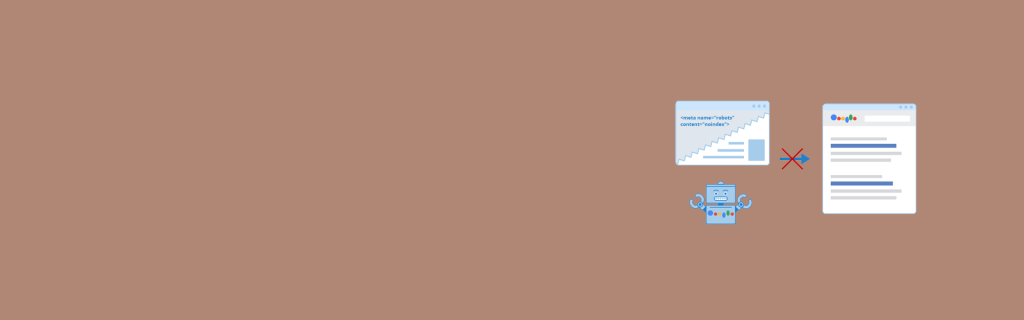
Noindex meta tags refer to those meta robot tags which direct the search engine not to include the search pages in the search results. Noindex can be done by adding a tag to the head section of the HTML or the reaction of the headers. But the search engine needs to be instructed disallowing the information in the robots.txt.file. When you block your page with the robots.txt.file, google will never receive your no index tag and the searched page will keep appearing. An example of a noindex meta tags are <meta name=”robots” content=”noindex, follow”> And as an alternative to the noindex tag, X robots tags can be used in the HTTP reader. Usage of noindex in robots.txt.file If you are accessing the robots.txt.file, you can noindex lots of pages in one go. And it’s the quickest and easiest way of doing so. If noindex page is put in robots.txt.file, the example of it are Noindex:/robots-txt-indexed-page/ But when you are using noindex tags you need to make sure that the tag will not be directed to a vulnerable page which can be removed from the search engine results. This can also make various new old websites to stop crowding from the users. Noindex meta tags will act as the meta robots or response headers which enables users not to index the real page or current page but the link page will be crawled in meta robot tag. Mostly noindex is used for laminated listing pages. With noindex meta tags, you can utilise granular specific pages to control individual page indexing and to be presented in the Google search results. Name attributes values will be a specification for the directive app that is the crawler. You will address the value name and crawler name for a specific crawler. With this article, you must have got an idea of how a noindex meta tag works and how useful it is. If you want to improve the SEO ranking, you need to know about the index and it’s working. No index meta tags will direct google and it’s search page about how to use it. Here the value name and the content attribute both are non-sensitive cases. Search results will have different crawlers for different properties and purposes. For google web search results but now show in google news. Know More: Website Designing Company in Mumbai